

Every organization has taxonomies. They might live in an Excel file passed around by email, a SharePoint wiki curated by one dedicated person, or a paid taxonomy tool that only half the team actually uses. The concepts are there. The hierarchy is there. But the moment a team needs to connect that taxonomy to another system — a product database, a search engine, an AI assistant — things fall apart.
Knowledge graphs built with open web standards can turn a taxonomy from an isolated document into a living, connected piece of an organization’s data landscape. This can be achieved without vendor lock-in, while using a fully interoperable, healthy ecosystem of open-source and commercial software.
Most importantly, a taxonomy is not only a hierarchy of terms. It is the language of an organization: a practical dictionary that unlocks enterprise speech and makes internal business objects understandable across teams and systems. In the era of AI, writing down this organizational language is more important than ever. For LLM-based use cases, there are two paths: the model can interpret input terms by linking them to generally available knowledge, which works for generalistic domains. Alternatively, the organization can provide explicit context that explains internal terms and objects. A taxonomy fulfills this context role and helps an LLM understand what a given document or dataset is actually about.
Table of Contents
What Is a Taxonomy, Really?
At its core, a taxonomy is a structured list of concepts organized in a hierarchy. Think of a vehicle taxonomy:
-
Vehicle type is the top concept
-
Passenger car is a narrower concept under it
- Sports car, SUV, and Luxury car fall under Passenger car
-
Passenger car is a narrower concept under it
-
Commercial vehicle is another branch
- Truck sits under that
Each concept usually has a preferred name (“Sports car”) and possibly alternative names that people also use (“Performance car”). This is the content — the knowledge about the enterprise language — that a team has built up over time.
Taxonomy elements can also be linked to other elements and enriched with short descriptions, so meaning remains clear for both humans and machines.
The Fragmentation Problem
In practice, taxonomies end up in many different places:
| Where | What it looks like |
|---|---|
| Excel / CSV | Rows with ID, label, parent, synonyms |
| SharePoint / Wiki | A page someone updates occasionally |
| PoolParty, Collibra | Managed taxonomy tools |
| Someone’s head | The most common storage format |
Each system has its own format. Moving a taxonomy from Excel to a search engine requires custom glue code. Connecting it to a product catalog requires more glue code. Every connection is a one-off project.
What is needed is a common layer — a format that any system can read, that preserves the meaning of concepts, and that enables links to other data without starting from scratch each time.
The Semantic Web Stack: A Common Language for Data
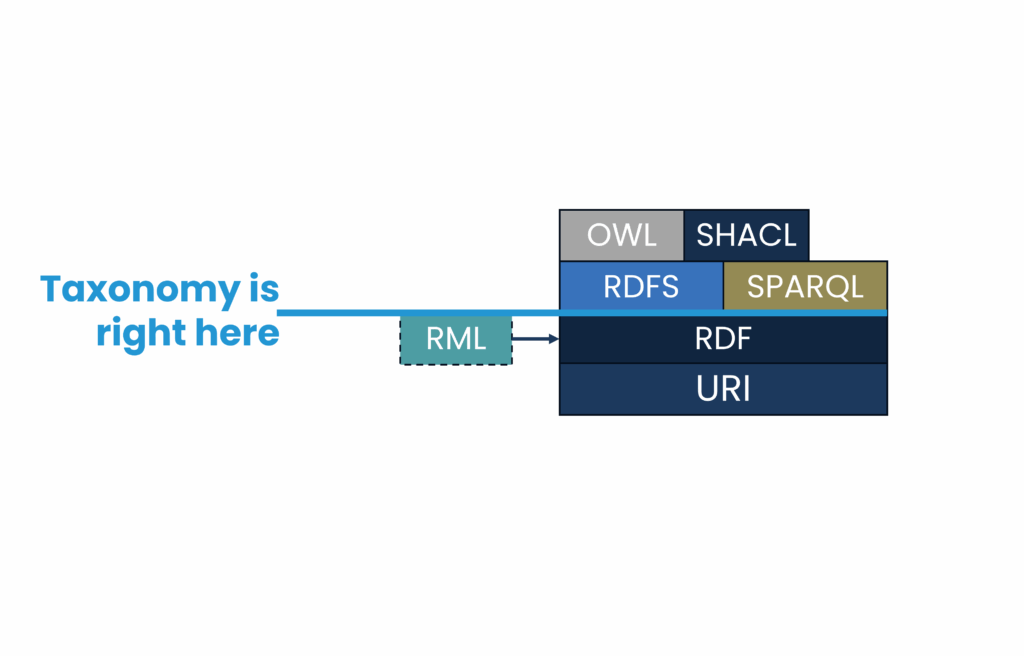
The World Wide Web Consortium (W3C) — the same body that standardizes HTML — has defined a family of open standards for representing and connecting data on the web. Together, these form the Semantic Web stack.
For taxonomy work, four of these standards matter most:
| Standard | What it does in plain terms |
|---|---|
| RDF | A universal format for expressing any fact as a triple: subject – predicate – object |
| SKOS | A vocabulary built on RDF specifically designed for taxonomies and thesauri |
| SPARQL | A query language for retrieving data from an RDF graph (like SQL, but for graphs) |
| SHACL | A way to define and check rules about data structure |
Think of RDF as the paper, SKOS as the template printed on that paper, SPARQL as the search function, and SHACL as the spell-checker.
The following sections walk through each one with a vehicle taxonomy as the running example.
Step 1: Represent a Taxonomy with SKOS
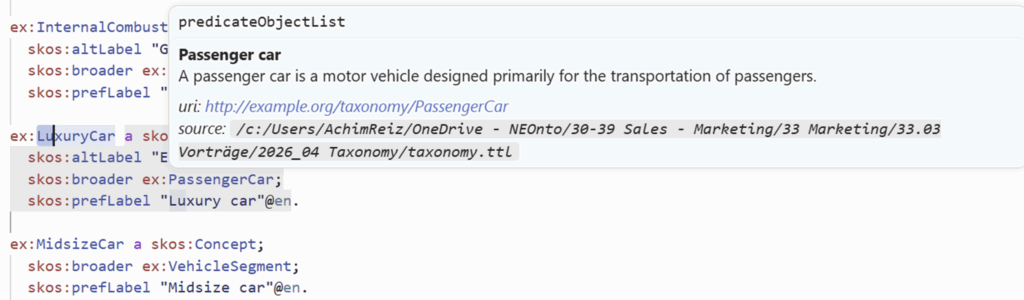
SKOS stands for Simple Knowledge Organization System. It was designed exactly for this use case: expressing concepts, their preferred labels, alternative labels, hierarchical relationships, links to related concepts, and textual descriptions in a machine-readable way.
Here is what three entries from a vehicle taxonomy look like in SKOS (written in a format called Turtle):
@prefix skos: <http://www.w3.org/2004/02/skos/core#> .
@prefix ex:   <http://example.org/taxonomy/> .

ex:PassengerCar a skos:Concept ;
    skos:prefLabel "Passenger car"@en ;
    skos:altLabel  "Family car"@en .

ex:SportsCar a skos:Concept ;
    skos:prefLabel "Sports car"@en ;
    skos:altLabel  "Performance car"@en ;
    skos:broader   ex:PassengerCar .

ex:SUV a skos:Concept ;
    skos:prefLabel "SUV"@en ;
    skos:altLabel  "Sport utility vehicle"@en ;
skos:broader ex:PassengerCar .Reading this out loud: “PassengerCar is a concept. Its preferred label is ‘Passenger car’. SportsCar is a concept. It is broader-related to PassengerCar, meaning it is a narrower type of passenger car.”
Two things are worth noting:
-
Every concept has a URI — a web address like
http://example.org/taxonomy/SportsCar. This is not just a name, it is a globally unique identifier. Any system, anywhere, that refers to this URI is talking about the exact same concept. - RDF can be serialized to plain text. It can be opened in any editor, stored in version control (Git), and processed with hundreds of available open-source tools.
Step 2: Bring Existing Data In (with YARRRML)
Most teams do not want to rewrite an entire taxonomy by hand in the format above, and there is no need to do so. If a taxonomy already lives in a spreadsheet, it can be converted automatically using a mapping language called YARRRML.
Imagine a taxonomy stored in a CSV file like this:
Preferred,ID,Broader,Alternative
Passenger car,PassengerCar,VehicleType,Family car
Sports car,SportsCar,PassengerCar,Performance car
SUV,SUV,PassengerCar,Sport utility vehicle
Truck,Truck,CommercialVehicle,Commercial truckA YARRRML mapping file describes the translation rules. After that, any mapping engine (such as the free, open-source tool Morph-KGC) applies those rules automatically to produce the SKOS graph:
prefixes:
  skos: "http://www.w3.org/2004/02/skos/core#"
  ex:   "http://example.org/taxonomy/"

mappings:
  taxonomy:
    sources:
      - access: taxonomy_concepts.csv
        delimiter: ","
    s: ex:$(ID)
    po:
      - [rdf:type,       skos:Concept]
      - [skos:prefLabel, "$(Preferred)", en~lang]
      - [skos:altLabel,  "$(Alternative)", en~lang]
- [skos:broader, ex:$(Broader)]The mapping says: “For each row in the CSV, create a concept with the URI built from the ID column, attach the Preferred column as its label, the Alternative column as an alternative label, and the Broader column as its parent concept.”
By mapping an existing taxonomy table can into a graph, we create a reusable template that can keep our graph up to date by simply updating the table and rerunning the mapping.
Step 3: Query the Taxonomy with SPARQL
Once a taxonomy lives in an RDF graph, it can be queried with SPARQL, a query language having some similarities to SQL, but works on graph-shaped data.
For example, to retrieve all concepts together with their preferred label and any alternative labels:
PREFIX skos: <http://www.w3.org/2004/02/skos/core#>

SELECT ?prefLabel ?altLabel
WHERE {
    ?concept a skos:Concept .
    OPTIONAL { ?concept skos:prefLabel ?prefLabel . }
    OPTIONAL { ?concept skos:altLabel  ?altLabel . }
}This returns a flat table — exactly the kind of output that can be fed into a search engine, an export file, or a report. The result might look like this:
| prefLabel | altLabel |
|---|---|
| Passenger car | Family car |
| Sports car | Performance car |
| SUV | Sport utility vehicle |
| Commercial vehicle | Work vehicle |
| Commercial vehicle | Utility vehicle |
The same query works across multiple taxonomies stored in the same graph, and can be extended to traverse the hierarchy or filter by branch.
Step 4: Validate the Taxonomy with SHACL
A taxonomy is only as useful as it is consistent. Common problems include concepts without a label, duplicate preferred labels in the same language, or entries that have no parent concept at all.
SHACL (Shapes Constraint Language) lets teams define structural rules that a taxonomy must follow, and then automatically check whether the data meets them.
Here is a simple SHACL rule that says: “Every concept must have at least one preferred label, and that label must carry a language tag.”
@prefix sh:   <http://www.w3.org/ns/shacl#> .
@prefix skos: <http://www.w3.org/2004/02/skos/core#> .

ex:ConceptShape a sh:NodeShape ;
    sh:targetClass skos:Concept ;
    sh:property [
        sh:path     skos:prefLabel ;
        sh:minCount 1 ;
        sh:datatype rdf:langString ;
        sh:message  "Every concept needs at least one preferred label with a language tag." ;
] .When a SHACL validator runs against the graph, it reports every concept that violates this rule — by name, with the defined message. It can be seen as a test suite for the taxonomy: the team defines what “correct” looks like, and the validator shows where we need to improve.
This is particularly powerful when taxonomy contributions come from multiple teams or systems. Incoming data can be checked automatically before it enters the graph.
Putting It All Together
The four steps form a clean, repeatable pipeline:
CSV / Excel
    │
    ▼  (YARRRML mapping)
RDF Graph with SKOS
    │
    ├──▶  SPARQL queries  →  search, export, APIs
    │
    └──▶  SHACL validation  →  quality reports
Each step uses an open W3C standard. This means:
| Interoperability | Any system that speaks RDF can consume the taxonomy directly. |
| No vendor lock-in | Teams can switch tools at any step without losing data. |
| Extensibility | The taxonomy can be connected to other RDF data — product catalogs, ontologies, external reference datasets like Wikidata — using the same mechanism. |
| Transparency. | Everything can be transferred to plain text, version-controllable, and auditable. |
| Integrated | RDF, SKOS, SPARQL, and SHACL are general semantic web standards and can also be used for many other linked-data scenarios. |
The vehicle taxonomy example is deliberately simple. But the same approach scales directly to:
- Product classification systems used across ERP, e-commerce, and search
- Internal glossaries that feed AI assistants and retrieval-augmented generation (RAG) pipelines
- Metadata schemas for data catalogs and governance platforms
In every case, the core benefit is the same: a single, well-structured, machine-readable source of truth that any system can use without a custom integration project.
Getting Started With neonto
The good news: there is no need to replace existing tools to get started. The CSV can stay in Excel. The taxonomy tool can keep running. The RDF layer is added on top — as a canonical export format that other systems can rely on.
A practical first step: export the most important taxonomy to CSV and write a YARRRML mapping for it. The result is a SKOS graph that can be loaded into any free triple store (such as Apache Jena or Oxigraph) and immediately queried with SPARQL.
For guidance on how to build this pipeline in an organization, neonto also offers consulting. To discuss a project or learn the full RDF stack at an individual pace, book a call with us. The team also offers an online academy with over 30 hours of practical learning material and a VS Code-based RDF editor designed to make exactly this kind of work straightforward.